> ## Documentation Index
> Fetch the complete documentation index at: https://docs.chargeblast.com/llms.txt
> Use this file to discover all available pages before exploring further.
# Webhooks
> This page will help you get started with our webhooks.
### Headers
### Body
The individual merchant this alert belongs to. You can call the [Fetch Merchants](/api-reference/enrollment/fetch-merchants) endpoint to get all possible merchant IDs for your account.
The alert network or source. See [Alert Types](/reference/alert-types) for all possible values.
```json theme={null}
{
"alertId": "al_genericId123",
"alertType": "FRAUD",
"amount": 500.00,
"arn": "12345678901234567890123",
"authCode": "ABC123",
"card": "123456xxxxxxx7890",
"cardBrand": "visa",
"createdAt": "2024-10-31 21:57:23.601000Z",
"creditAppealed": false,
"creditStatus": "None",
"currency": "usd",
"customerEmail": "customer@example.com",
"customerId": "cus_genericId456",
"descriptor": "GENERIC TXN12345",
"externalOrder": "ch_genericOrder789",
"externalUrl": "https://example.com/charges/ch_genericOrder789",
"id": "al_genericId123",
"issuer": "Generic Bank, Inc.",
"merchantId": "cb_genericMerchantId",
"provider": "exampleProvider",
"reasonCode": "Resolved",
"responseAction": "Accepted",
"site": "example.com",
"subprovider": "Ethoca",
"transactionDate": "2024-09-30 00:00:00.000000Z"
}
```
***
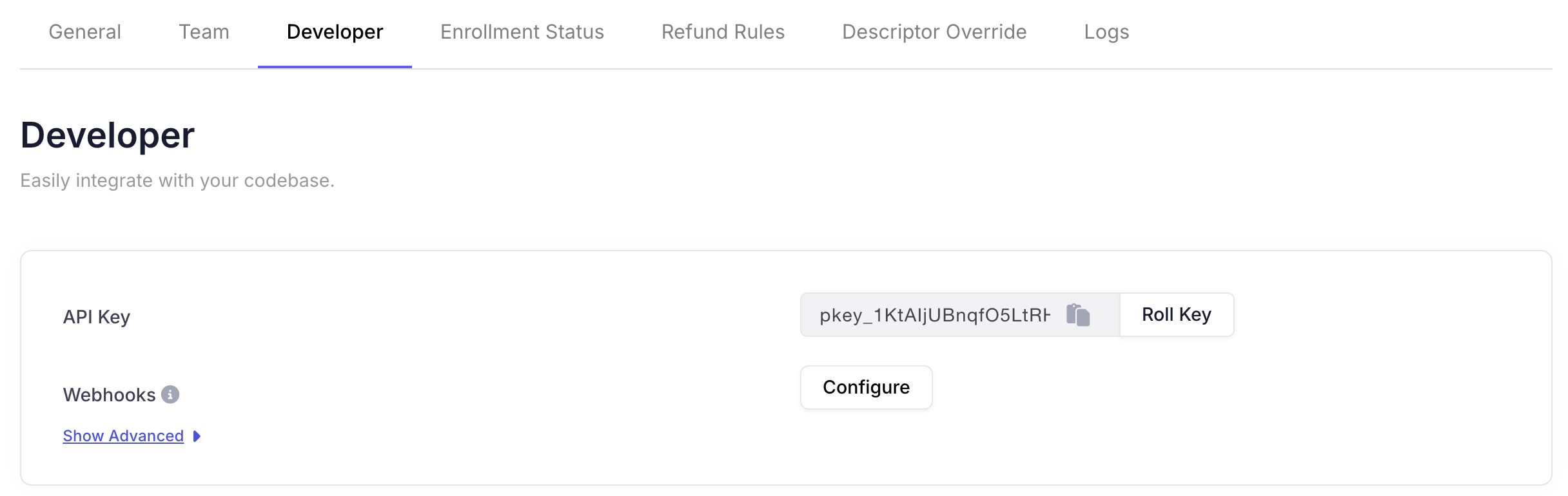
First set up your webhook URL in the Chargeblast dashboard in the settings tab.
 Chargeblast will begin emitting events to your webhook URL with the following schema. These events will be fired anytime a new alert is generated.
The `externalOrder` field is not available in the `alert.created` event.
Please use the `alert.updated` event if you require this field.
### Authentication
To authenticate the integrity of incoming webhooks, a header is passed into the post request to your endpoint under the header name `svix-signature`. The value in this header is an HMAC-SHA256 encoded string using the payload of the request with the webhook secret as key.
In order to authenticate the request, you perform a HMAC-SHA256 encoding using a concat of webhook request body, `svix_timestamp` and `svix_id` and your webhook secret (whsec\_xxxxxxxxxxxx) and ensure these strings match. Then input string to SHA256 HMAC will look like:
`signedContent = "${svix_id}.${svix_timestamp}.${body}"`
This is a common method for ensuring that the webhook messages you receive in your server are from a trusted source and haven't been tampered with.
```Javascript theme={null}
const crypto = require('crypto');
const signedContent = `${svix_id}.${svix_timestamp}.${body}`;
const secret = "whsec_xxxxxxxx";
// Need to base64 decode the secret
const secretBytes = Buffer.from(secret.split('\_')[1], "base64");
const signature = crypto
.createHmac('sha256', secretBytes)
.update(signedContent)
.digest('base64');
console.log(signature);
```
The svix-signature header is composed of a list of space delimited signatures and their corresponding version identifiers. The signature list is most commonly of length one. Though there could be any number of signatures. For example:
v1,bm9ldHUjKzFob2VudXRob2VodWUzMjRvdWVvdW9ldQo= v2,MzJsNDk4MzI0K2VvdSMjMTEjQEBAQDEyMzMzMzEyMwo=
Make sure to remove the version prefix and delimiter (e.g. v1,) before verifying the signature. Use v1. In this example, you'd compare your signature against `bm9ldHUjKzFob2VudXRob2VodWUzMjRvdWVvdW9ldQo=`.
### Types
There is currently the following webhook types:
* `alert.created`: transmitted when an alert is first created.
* `alert.updated`: transmitted when an alert's status is updated. Use this if you require `externalOrder` the field.
* `alert.refunded`: transmitted when an alert triggers a transaction to be refunded.
***
### Related
* [Alert Types](/reference/alert-types) — Full list of alert networks and subprovider values
* [Reason Codes](/reference/reason-codes) — Codes used when actioning alerts
Built with [Mintlify](https://mintlify.com).
Chargeblast will begin emitting events to your webhook URL with the following schema. These events will be fired anytime a new alert is generated.
The `externalOrder` field is not available in the `alert.created` event.
Please use the `alert.updated` event if you require this field.
### Authentication
To authenticate the integrity of incoming webhooks, a header is passed into the post request to your endpoint under the header name `svix-signature`. The value in this header is an HMAC-SHA256 encoded string using the payload of the request with the webhook secret as key.
In order to authenticate the request, you perform a HMAC-SHA256 encoding using a concat of webhook request body, `svix_timestamp` and `svix_id` and your webhook secret (whsec\_xxxxxxxxxxxx) and ensure these strings match. Then input string to SHA256 HMAC will look like:
`signedContent = "${svix_id}.${svix_timestamp}.${body}"`
This is a common method for ensuring that the webhook messages you receive in your server are from a trusted source and haven't been tampered with.
```Javascript theme={null}
const crypto = require('crypto');
const signedContent = `${svix_id}.${svix_timestamp}.${body}`;
const secret = "whsec_xxxxxxxx";
// Need to base64 decode the secret
const secretBytes = Buffer.from(secret.split('\_')[1], "base64");
const signature = crypto
.createHmac('sha256', secretBytes)
.update(signedContent)
.digest('base64');
console.log(signature);
```
The svix-signature header is composed of a list of space delimited signatures and their corresponding version identifiers. The signature list is most commonly of length one. Though there could be any number of signatures. For example:
v1,bm9ldHUjKzFob2VudXRob2VodWUzMjRvdWVvdW9ldQo= v2,MzJsNDk4MzI0K2VvdSMjMTEjQEBAQDEyMzMzMzEyMwo=
Make sure to remove the version prefix and delimiter (e.g. v1,) before verifying the signature. Use v1. In this example, you'd compare your signature against `bm9ldHUjKzFob2VudXRob2VodWUzMjRvdWVvdW9ldQo=`.
### Types
There is currently the following webhook types:
* `alert.created`: transmitted when an alert is first created.
* `alert.updated`: transmitted when an alert's status is updated. Use this if you require `externalOrder` the field.
* `alert.refunded`: transmitted when an alert triggers a transaction to be refunded.
***
### Related
* [Alert Types](/reference/alert-types) — Full list of alert networks and subprovider values
* [Reason Codes](/reference/reason-codes) — Codes used when actioning alerts
Built with [Mintlify](https://mintlify.com).