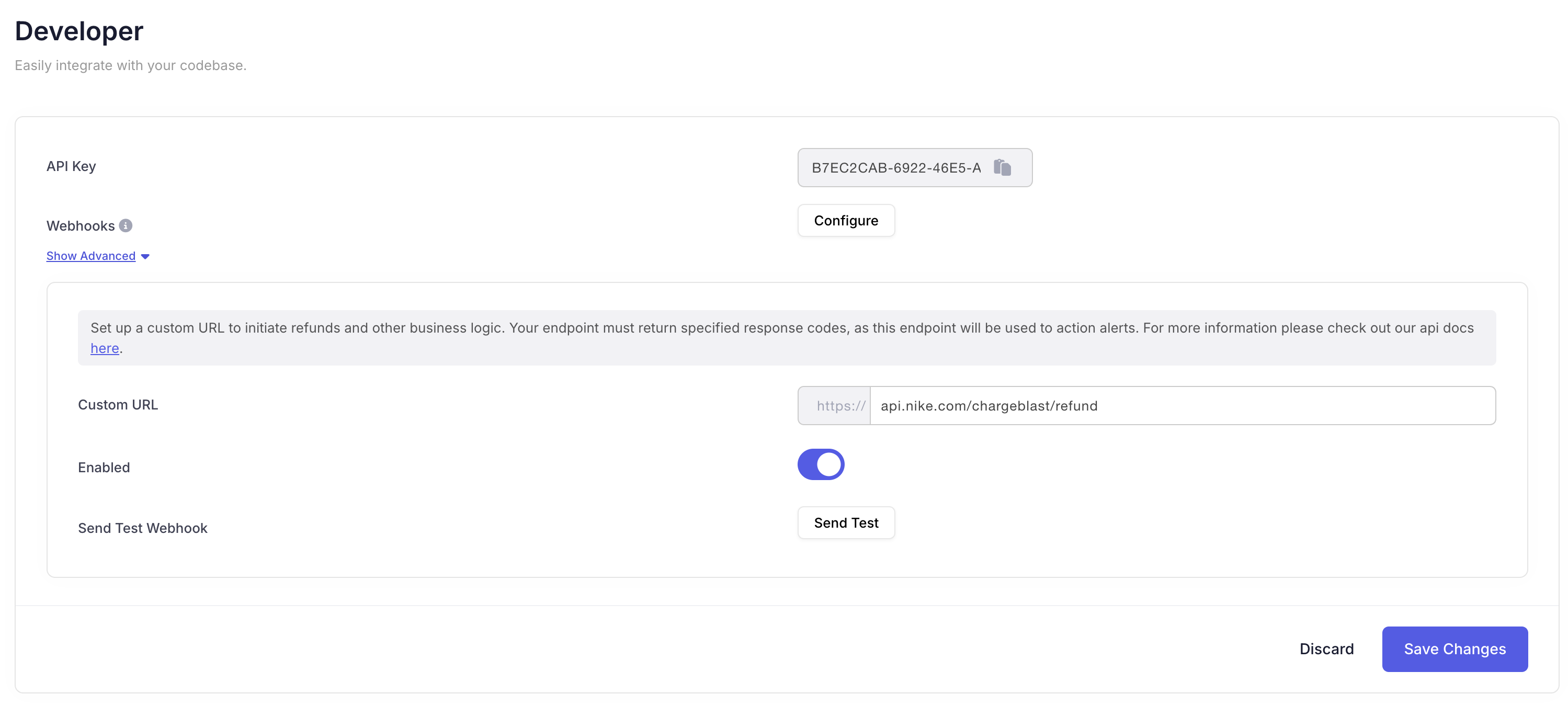
# Fetch Alerts Source: https://docs.chargeblast.com/api-reference/alerts/fetch-alerts get /api/v2/alerts Get all the alerts from your chargeblast account. The `subprovider` field indicates the alert network. See [Alert Types](/reference/alert-types) for all possible values and descriptions. Each alert may include optional **`attributes`**: a dictionary of string keys and string values (for example `order_number`, `processor_id`). The same field appears on [webhook](/api-reference/webhooks/setup#body) payloads when present. # Fetch an Alert Source: https://docs.chargeblast.com/api-reference/alerts/fetch-an-alert get /api/v2/alert/{id} Get a specific alert. The `subprovider` field indicates the alert network. See [Alert Types](/reference/alert-types) for all possible values and descriptions. The alert may include optional **`attributes`**: a dictionary of string keys and string values (for example `order_number`, `processor_id`). The same field appears on [webhook](/api-reference/webhooks/setup#body) payloads when present. # Update Alert Source: https://docs.chargeblast.com/api-reference/alerts/update-alert post /api/v2/alerts/update/{id} Update the state of an alert to properly inform the banks of whether or not a refund will be issued. If an alert is left unactioned for 72 hours it will be automatically declined. For best results mark alerts as resolved within 24 hours of receiving them (some smaller banks will escalate quarantined transactions as soon as 24 hours within propogating an alert). If you attempt to update an already actioned alert, the request will fail. See the full list of available reason codes and their descriptions in the [Reason Codes Reference](/reference/reason-codes). # Create Credit Request Source: https://docs.chargeblast.com/api-reference/credit-requests/create post /api/v2/credit-request/create Creates a credit request for a rejected alert. Will fail if requesting credit from resolved alert or alert with an existing credit request, otherwise will simply return 200 response code. # Fetch Deflection Logs Source: https://docs.chargeblast.com/api-reference/deflections/logs get /api/v3/deflections/logs Get a list of all look up requests. # Enroll Merchant Source: https://docs.chargeblast.com/api-reference/enrollment/enroll-merchant post /api/enroll_merchant Enroll a merchant in an alert or refund program. Send a `program` discriminator with that program's fields. `ethoca` and `cdrn` require `descriptors`. `rdr` requires `arns` and/or equal-length paired `bins`/`caids` (its `bins`/`caids` are persisted as queryable RDR descriptors). `amex` and `discover` require legal name, DBA, address, and their SE identifiers (they now persist a `Pending` descriptor you can poll). Enrollment files a request; records start `Pending` and become `Enrolled` once the provider-side enrollment confirms. Pass `merchant_id` to target a specific merchant, or omit it to create a brand-new merchant. Poll `GET /api/enrollment_status` for per-program state. # Enrollment Lifecycle Source: https://docs.chargeblast.com/api-reference/enrollment/enrollment-lifecycle How enrollment works across programs: enrolling files a request, records start Pending, and they become Enrolled once the provider confirms. ## Enrollment files a request Calling [`POST /api/enroll_merchant`](/api-reference/enrollment/enroll-merchant) records your intent and persists a descriptor. It does **not** instantly make that descriptor live with the card network. Provider-side enrollment is a separate step that Chargeblast completes, so every record moves through a lifecycle: ``` enroll -> Pending -> Enrolled -> (unenroll) PendingRemoval -> removed ``` * **`Pending`** — the enrollment request is on file; the provider has not confirmed yet. * **`Enrolled`** — live with the provider; alerts route to this descriptor. * **`PendingRemoval`** — an unenroll was requested for a live descriptor; it stays active until the provider confirms de-registration, then the record is deleted. Poll [`GET /api/enrollment_status`](/api-reference/enrollment/enrollment-status) for a per-program roll-up (`none` / `pending` / `enrolled`), or [`GET /api/v2/descriptors`](/api-reference/enrollment/fetch-descriptors-v2) for the individual records and their statuses — filterable by `program` and `status`, and paginated. [`GET /api/descriptors`](/api-reference/enrollment/fetch-descriptors) remains available. ## What each program persists | Program | Enroll input | Persisted record | Becomes `Enrolled` when | | ------------ | ----------------------- | -------------------------------------------------------------------- | ----------------------- | | **Ethoca** | `descriptors` | One descriptor per name | Provider sync confirms | | **CDRN** | `descriptors` | One descriptor per name | Provider sync confirms | | **RDR** | `arns`, `bins`, `caids` | One descriptor per BIN/CAID pair (ARNs also stored on your settings) | Verifi sync confirms | | **Amex** | legal / DBA / SE fields | One `Pending` descriptor tagged `amex` | Onboarding completes | | **Discover** | legal / DBA / SE fields | One `Pending` descriptor tagged `discover` | Onboarding completes | ## Typical timelines Provider-side confirmation is not instant. Expect: * **Ethoca** \~48 hours * **CDRN** \~24 hours * **RDR** \~2 weeks * **Amex** \~4-6 weeks * **Discover** \~7 days ## Merchant resolution Pass `merchant_id` to target a specific existing merchant (list them via [`GET /api/v2/merchants`](/api-reference/enrollment/fetch-merchants)), or omit it to create a brand-new merchant. The resolved id is returned as `merchantId`, and `merchantCreated` tells you whether it was newly created or an existing merchant you targeted. ## Unenrolling [`POST /api/unenroll`](/api-reference/enrollment/unenroll-merchant) splits the outcome: * **`removed`** — descriptors that were still `Pending` (never live) are deleted immediately. * **`queued`** — descriptors that were live are marked `PendingRemoval` and stay visible until the provider de-registration confirms, after which the record is deleted. * **`skipped`** — descriptors you own but whose status was not actionable (`Processing` / `InReview`, or already-terminal `Disabled` / `Rejected` / `Surpressed`), left untouched. * **`notFound`** — ids that do not belong to your account. The `unenrolled` response field is deprecated. It is retained as the union of `removed` and `queued` for backward compatibility; migrate to `removed` and `queued`. # Enrollment Status Source: https://docs.chargeblast.com/api-reference/enrollment/enrollment-status get /api/enrollment_status Report your merchant's enrollment status for every program (Ethoca, CDRN, RDR, Amex, Discover). Each entry is `none`, `pending`, or `enrolled`. Enrollment via the API files a request, so a program stays `pending` until the provider-side enrollment confirms (which flips it to `enrolled`). The contributing descriptor records are included so you can correlate by descriptor name or BIN/CAID. # Fetch Descriptors Source: https://docs.chargeblast.com/api-reference/enrollment/fetch-descriptors get /api/descriptors Fetch all the descriptors for your merchants. # Fetch Descriptors (v2) Source: https://docs.chargeblast.com/api-reference/enrollment/fetch-descriptors-v2 get /api/v2/descriptors List every descriptor on your account as a flat, filterable record set: one row per descriptor with its program (`ethoca`, `cdrn`, `rdr`, `amex`, `discover`; `null` for legacy types not tied to a program), status, descriptor name or BIN/CAID, owning merchant id, and timestamps. Filter with `program` and/or `status` (case-insensitive; an unknown value returns a 400 listing the valid ones) and paginate with `page`/`per`. Use `GET /api/enrollment_status` for the per-program roll-up instead; record ids feed `POST /api/unenroll`. Returns your descriptors as a flat, filterable list — one record per descriptor with its program, status, name or BIN/CAID, and owning merchant id. Filter with the `program` and `status` query parameters; the response is **paginated** using `page` and `per`. For the per-program roll-up (`none` / `pending` / `enrolled`), use [`GET /api/enrollment_status`](/api-reference/enrollment/enrollment-status) instead. Record ids feed [`POST /api/unenroll`](/api-reference/enrollment/unenroll-merchant). # Fetch Merchant Source: https://docs.chargeblast.com/api-reference/enrollment/fetch-merchant get /api/merchant Get an individual merchant from your chargeblast account. # Fetch Merchants Source: https://docs.chargeblast.com/api-reference/enrollment/fetch-merchants get /api/v2/merchants Get all the merchants from your chargeblast account. Response is paginated. The `name` field is set during onboarding of the merchant and corresponds to the individual name of the merchant for multi-merchant accounts (usually associated with the DBA or billing descriptor). Returns all merchants for your Chargeblast account. The response is **paginated** using the `page` and `per` query parameters. Each merchant in the response includes a **name** and **id**. The `name` is set during onboarding and, for multi-merchant accounts, corresponds to the individual merchant name (typically the DBA or billing descriptor). The merchant **id** returned here is the same value as the `merchantId` in the [webhook alert payload](/api-reference/webhooks/setup#body)—use it to associate incoming alerts with the correct merchant. # Unenroll Merchant Source: https://docs.chargeblast.com/api-reference/enrollment/unenroll-merchant post /api/unenroll Unenroll one or more descriptors. Pass `descriptor_ids` (obtain ids from `GET /api/v2/descriptors`); a single legacy `descriptor_id` is also accepted. Descriptors that were still `Pending` (never live with the provider) are removed immediately and returned under `removed`. Descriptors that were live are marked `PendingRemoval` — a visible "removing" state on the API and dashboard — and returned under `queued`; Chargeblast completes the provider-side de-registration (Ethoca ~48 hours, RDR ~2 weeks, CDRN ~24 hours), after which the record is deleted and your settings reflect the removal. Any ids that do not belong to your account are returned under `notFound`. # RDR Action Endpoint Source: https://docs.chargeblast.com/api-reference/getting-started/rdr-endpoint ## Overview You are able to set up custom responses for RDR via API. This is intended only to be used by marketplace platforms that require sub-account level RDR responses. If your endpoint goes down or fails to respond, alerts cannot be retried and you may receive chargebacks. To avoid this, please make sure your implementation is reliable. If your endpoint is unresponsive or times out, the RDR will turn into a chargeback. #### Endpoint Requirements **HTTP Method:** POST\ **Header:** `X-API-Key` (Your unique API key) Your endpoint should accept a POST request with the API key included in the header: `https://your-domain.com/your-endpoint` You can set this URL in your account under developer settings: #### Request Body The request body will include the necessary details for determining how to action the RDR alert. Note your endpoint need ony return an accepted/declined response - no refund is actually performed within your implementation. Refunds for RDR are performed directly via Visa in realtime based on your response. Your endpoint must respond in 1.5 seconds. Here's an example request body: ```json theme={null} { "arn": "24112315071512011675836", "type": "Fraud", // or "NotFraud" "authCode": "013A3B", "first6": "424242", "last4": "1234", "descriptor": "NIKE SHOES", "currency": "USD", "amount": 45.15, // amount (not in cents) "transactionDate": "2025-11-12T00:00:00Z" } ``` #### Response Your endpoint must return a response that conforms to the following payload: ```json theme={null} { "action": "Resolved" } ``` The potential responses are: * Resolved - the RDR alert should be accepted - i.e. refunded by Visa. * Declined - the RDR alert should be rejected - i.e. turn into a chargeback. Return with a 200 status code in either scenario. See the full list of available reason codes and their descriptions in the [Reason Codes Reference](/reference/reason-codes). Once you have implemented this endpoint, please reach out to your account manager to migrate RDR decisioning logic to API. This will take 1-2 business days. # Authorization Source: https://docs.chargeblast.com/api-reference/introduction/authorization ## Base URL The Chargeblast API is built on **REST** principles. We enforce **HTTPS** in every request to improve data security, integrity, and privacy. The API does not support **HTTP**. All requests contain the following base URL: ``` https://api.chargeblast.com ``` ## Authentication To authenticate you need to add an [API key](https://app.chargeblast.com/settings/developer) as a *header* in each request, like so: ``` X-API-Key: phkey_123456789 ``` For endpoints that are paginated, you can simply pass in `?per=100&page=0` as query string parameters (where the page starts at index = 0). Versioning is done in the route of the endpoint itself. We are currently on version 2 of our API, and all our routes will be prefixed by v2. For example `/api/v2/alerts`. # Fetch Order Source: https://docs.chargeblast.com/api-reference/sync-data/get-order get /api/v2/orders/{id} Get a specific the order from your chargeblast account. Receipt info is included with this endpoint. # Fetch Orders Source: https://docs.chargeblast.com/api-reference/sync-data/get-orders get /api/v2/orders Get all the orders from your chargeblast account. Receipt info is omitted from this endpoint. # Upload IP Data Source: https://docs.chargeblast.com/api-reference/sync-data/track post /api/v2/track This is used to upload IP data. Not needed if you are implementing /orders/upload (instead pass IP data there) - only used if you are on a supported integration and want to board with compelling evidence. # Upload Orders Source: https://docs.chargeblast.com/api-reference/sync-data/upload-orders post /api/v2/orders/upload Upload orders to the chargeblast system. This will allow you to match disputes and chargebacks to the orders you have uploaded. Amount should be in cents, e.g. $19.99 => amount = 1999. This endpoint is rate limited to 100 requests every 10 seconds. # Webhooks Source: https://docs.chargeblast.com/api-reference/webhooks/setup https://yourwebsite.com/webhook/endpoint This page will help you get started with our webhooks. ### Headers ### Body Dictionary of string keys and string values for optional metadata on the alert (for example order number, processor id). Same field appears on webhook payloads and on alert objects returned from the Alerts API. The individual merchant this alert belongs to. You can call the [Fetch Merchants](/api-reference/enrollment/fetch-merchants) endpoint to get all possible merchant IDs for your account. The card network transaction ID for the disputed transaction. Useful for matching the alert against the network transaction ID your payment processor reports. **Optional** — only present when the alert network provides it, so keep fallback matching on `arn`, `authCode`, card, amount, and `transactionDate`. The alert network or source. See [Alert Types](/reference/alert-types) for all possible values. ```json theme={null} { "alertId": "al_genericId123", "alertType": "FRAUD", "amount": 500.00, "attributes": { "order_number": "#1533", "processor_id": "proc_b381c83a9bc8a93" }, "arn": "12345678901234567890123", "authCode": "ABC123", "card": "123456xxxxxxx7890", "cardBrand": "visa", "createdAt": "2024-10-31 21:57:23.601000Z", "creditAppealed": false, "creditStatus": "None", "currency": "usd", "customerEmail": "customer@example.com", "customerId": "cus_genericId456", "descriptor": "GENERIC TXN12345", "externalOrder": "ch_genericOrder789", "externalUrl": "https://example.com/charges/ch_genericOrder789", "id": "al_genericId123", "issuer": "Generic Bank, Inc.", "merchantId": "cb_genericMerchantId", "networkId": "542418161516789787", "provider": "exampleProvider", "reasonCode": "Resolved", "responseAction": "Accepted", "site": "example.com", "subprovider": "Ethoca", "transactionDate": "2024-09-30 00:00:00.000000Z" } ``` *** First set up your webhook URL in the Chargeblast dashboard in the settings tab. Chargeblast will begin emitting events to your webhook URL with the following schema. These events will be fired anytime a new alert is generated. The `externalOrder` field is not available in the `alert.created` event. Please use the `alert.updated` event if you require this field. ### Authentication To authenticate the integrity of incoming webhooks, a header is passed into the post request to your endpoint under the header name `svix-signature`. The value in this header is an HMAC-SHA256 encoded string using the payload of the request with the webhook secret as key. In order to authenticate the request, you perform a HMAC-SHA256 encoding using a concat of webhook request body, `svix_timestamp` and `svix_id` and your webhook secret (whsec\_xxxxxxxxxxxx) and ensure these strings match. Then input string to SHA256 HMAC will look like: `signedContent = "${svix_id}.${svix_timestamp}.${body}"` This is a common method for ensuring that the webhook messages you receive in your server are from a trusted source and haven't been tampered with. ```Javascript theme={null} const crypto = require('crypto'); const signedContent = `${svix_id}.${svix_timestamp}.${body}`; const secret = "whsec_xxxxxxxx"; // Need to base64 decode the secret const secretBytes = Buffer.from(secret.split('\_')[1], "base64"); const signature = crypto .createHmac('sha256', secretBytes) .update(signedContent) .digest('base64'); console.log(signature); ``` The svix-signature header is composed of a list of space delimited signatures and their corresponding version identifiers. The signature list is most commonly of length one. Though there could be any number of signatures. For example: v1,bm9ldHUjKzFob2VudXRob2VodWUzMjRvdWVvdW9ldQo= v2,MzJsNDk4MzI0K2VvdSMjMTEjQEBAQDEyMzMzMzEyMwo= Make sure to remove the version prefix and delimiter (e.g. v1,) before verifying the signature. Use v1. In this example, you'd compare your signature against `bm9ldHUjKzFob2VudXRob2VodWUzMjRvdWVvdW9ldQo=`. ### Types Chargeblast emits several **`X-Event-Type`** values (for example `alert.created`, `alert.updated`, `alert.refunded`, `alert.matched`, `alert.will_expire`, `alert.within_refund_rules`). The guide below documents **which alert types apply to each webhook event** (for example whether Ethoca, CDRN, RDR, or TC40 can trigger that event), **when** each event fires, and **deduping** behavior: **[Webhook event types](/api-reference/webhooks/webhook-events)** *** ### Related * [Webhook event types](/api-reference/webhooks/webhook-events) — Full event-type reference (which of Ethoca, CDRN, RDR, TC40 apply per event) * [Alert Types](/reference/alert-types) — Full list of alert networks and subprovider values * [Reason Codes](/reference/reason-codes) — Codes used when actioning alerts # Alerts Implementation Source: https://docs.chargeblast.com/guides/alerts-implementation Learn how to implement CDRN (Visa) and Ethoca (Mastercard) alerts to intercept disputes before they become chargebacks. ## Overview Alerts notify you when a cardholder contacts their bank to dispute a transaction. By actioning alerts quickly (typically within 48 hours), you can issue a refund and prevent the dispute from escalating into a chargeback. Chargeblast supports two alert networks: * **Ethoca** (Mastercard) — Best coverage, front-runs other alert types * **CDRN** (Visa) — Issuer-based Visa product For information on **RDR** (Visa's acquirer-side product), see the [RDR Endpoint](/api-reference/getting-started/rdr-endpoint) documentation. RDR is handled automatically at the acquirer level and requires a separate implementation. *** ## Choose Your Integration Path ### How It Works 1. **Connect your transaction data** via one of two methods: * [Supported payment processor](https://www.chargeblast.com/integrations) (Stripe, Braintree, etc.) * [Upload Orders](/api-reference/sync-data/upload-orders) endpoint 2. **Chargeblast matches alerts to your transactions** automatically using card details, amounts, and dates. 3. **Receive webhooks** with matched `externalOrder` IDs: * `alert.created` — New alert received * `alert.updated` — Alert status changed (includes `externalOrder`) * `alert.refunded` — Alert triggered a refund 4. **Action alerts** by calling the [Update Alert](/api-reference/alerts/update-alert) endpoint with the appropriate reason code. ### Implementation Steps Either connect a [supported PSP](https://www.chargeblast.com/integrations) or implement the [Upload Orders](/api-reference/sync-data/upload-orders) endpoint to push transaction data. ```bash theme={null} POST /api/v2/orders/upload ``` Configure your [webhook URL](/api-reference/webhooks/setup) in the Chargeblast dashboard to receive alert notifications. When you receive an `alert.created` or `alert.updated` webhook with a matched `externalOrder`, process the refund in your payment system and then call the [Update Alert](/api-reference/alerts/update-alert) endpoint: ```bash theme={null} POST /api/v2/alerts/update/{id} { "result": "Resolved" } ``` **Strongly recommended:** Use the [Update Alert](/api-reference/alerts/update-alert) endpoint to action alerts. The [Refund Endpoint](/api-reference/getting-started/refund-endpoint) approach (where Chargeblast calls your server) is largely deprecated. With push data integration, alert webhooks include matched order IDs, making it easy to identify which transaction to refund. Webhook and API alert payloads may also include **`attributes`**: an optional dictionary of string keys and string values (for example `order_number`, `processor_id`) for extra metadata—see [Webhooks](/api-reference/webhooks/setup#body). ### How It Works 1. **Receive raw alerts** via webhooks or polling — alerts arrive without matched order IDs. 2. **You perform matching** using card details (BIN, last 4), amounts, dates, and auth codes. 3. **Action alerts** by calling the [Update Alert](/api-reference/alerts/update-alert) endpoint with the appropriate [reason code](/reference/reason-codes). ### Implementation Steps Either configure [webhooks](/api-reference/webhooks/setup) for `alert.created` events, or poll the [Fetch Alerts](/api-reference/alerts/fetch-alerts) endpoint periodically. Build logic to match incoming alerts to transactions in your system using: * Card BIN (first 6 digits) and last 4 digits * Transaction amount and currency * Transaction date * Auth code (if available) * ARN (Acquirer Reference Number, if available) When a match is found, process the refund in your payment system. Call the [Update Alert](/api-reference/alerts/update-alert) endpoint with the appropriate [reason code](/reference/reason-codes): ```bash theme={null} POST /api/v2/alerts/update/{id} { "result": "Resolved" } ``` For best results, action alerts within 48 hours. Unactioned alerts may escalate to chargebacks. *** ## API Reference | Endpoint | Description | | ------------------------------------------------------- | ------------------------------------- | | [Upload Orders](/api-reference/sync-data/upload-orders) | Push transaction data for matching | | [Fetch Alerts](/api-reference/alerts/fetch-alerts) | Poll for alerts | | [Fetch Alert](/api-reference/alerts/fetch-an-alert) | Get a specific alert | | [Update Alert](/api-reference/alerts/update-alert) | Action an alert with a reason code | | [Webhooks](/api-reference/webhooks/setup) | Receive real-time alert notifications | | [Reason Codes](/reference/reason-codes) | Full list of reason codes | *** ## Related * [Reason Codes Reference](/reference/reason-codes) — Full list of codes and when to use them * [RDR Endpoint](/api-reference/getting-started/rdr-endpoint) — Visa's acquirer-side dispute resolution * [Refund Endpoint](/api-reference/getting-started/refund-endpoint) — Legacy automated refund processing (deprecated) # Digital Receipts & Deflections Source: https://docs.chargeblast.com/guides/deflections-implementation Learn how to implement Digital Receipts, Compelling Evidence 3.0 (CE3.0), and First Party Trust (FPT) to prevent chargebacks before they happen. ## Overview Digital Receipts and Deflections work together to prevent chargebacks **before** they're filed. Unlike alerts (which intercept disputes in progress), these services stop disputes from starting. ### Digital Receipts When cardholders check their bank statement and don't recognize a charge, they see enriched transaction details — merchant name, logo, purchase description, and contact information. This reduces "What is this charge?" confusion that leads to friendly fraud. ### Deflections Deflections automatically block chargebacks using Visa's pre-dispute programs: When a cardholder disputes a transaction, Visa checks if the same device, IP address, or email was used for previous undisputed purchases. If compelling evidence exists, the chargeback is blocked automatically. Similar to CE3.0, but also uses billing/shipping address matching for even stronger fraud prevention. Digital Receipts and Deflections share the same implementation process. The difference is which qualifying fields you provide — if certain fields are present, transactions become eligible for CE3.0/FPT deflection. *** ## Qualifying Fields for Deflection To enable deflections, you must provide certain data fields with your transactions: | Field | CE3.0 | FPT | Description | | --------------------------- | ----- | --- | --------------------------------- | | Merchant Contact Phone | ✓ | ✓ | Customer service phone number | | IP Address | ✓ | ✓ | Customer's IP at time of purchase | | Customer Email | ✓ | ✓ | Email address used for the order | | Billing or Shipping Address | — | ✓ | Full address for FPT matching | The more fields you provide, the higher your deflection rate. FPT requires all fields including address; CE3.0 requires phone, IP, and email. *** ## Choose Your Integration Path ### How It Works 1. **Send enriched transaction data** via one of two methods: * [Supported payment processor](https://www.chargeblast.com/integrations) with receipt data * [Upload Orders](/api-reference/sync-data/upload-orders) endpoint with the `receipt` object * [Tracker Snippet](/guides/tracker-snippet) for IP capture on web 2. **Chargeblast handles all lookups** — when Visa queries for transaction data or compelling evidence, we respond automatically using your uploaded data. 3. **Monitor deflection logs** via the [Deflection Logs](/api-reference/deflections/logs) endpoint to see blocked chargebacks. ### Implementation Steps Upload transactions via the [Upload Orders](/api-reference/sync-data/upload-orders) endpoint, including the `receipt` object with qualifying fields: ```json theme={null} { "orders": [{ "id": "order_123", "amount": 1999, "currency": "usd", "transactionDate": "2024-01-15T10:30:00Z", "bin": "424242", "last4": "4242", "ip": "192.168.1.1", "receipt": { "customerEmail": "customer@example.com", "customerPhone": "+1234567890", "billingAddress": { "line1": "123 Main St", "city": "San Francisco", "state": "CA", "postalCode": "94102", "country": "US" }, "description": "Premium Subscription - Annual", "merchantName": "Acme Inc", "merchantUrl": "https://acme.com" } }] } ``` For automatic IP capture on web transactions, add the [Tracker Snippet](/guides/tracker-snippet) to your checkout page: ```html theme={null} ``` Then identify the user: ```javascript theme={null} Chargeblast.identify("customer@example.com") ``` Use the [Deflection Logs](/api-reference/deflections/logs) endpoint to track blocked chargebacks. With push data integration, Chargeblast automatically responds to Visa queries — no real-time endpoint required. ### How It Works 1. **Chargeblast POSTs lookup requests** to your HTTPS endpoint when a digital receipt / deflection lookup runs (event type `digital_receipt.lookup`). 2. **You match the transaction** from the JSON search criteria and return **HTTP 200** with a receipt body, or **HTTP 404** if not found. 3. **You must respond within 1.5 seconds** — a hard SLA for deflection and receipt flows. For request headers, HMAC verification, wire-format rules, and required response fields, see the full guide: **[Digital receipt lookup pull guide](/guides/digital-receipt-lookup)**. ### Implementation Steps Build your endpoint per the [digital receipt lookup guide](/guides/digital-receipt-lookup): verify `X-Digital-Receipt-Lookup-Key` and/or `X-Digital-Receipt-Signature`, read the **raw body** for HMAC, and match primarily on **`cardBin`**, **`cardLast4`**, **`currency`**, **`arn`**, **`authCode`**, **`transactionDate`**, and **`descriptor`** (all guaranteed on the wire). In Developer settings, set **Digital receipt lookup URL** (host and path without `https://`), enable the toggle, and store your **lookup key** and **lookup signature key**. Use **Send test webhook** to validate your integration. On success, return JSON with top-level **`order`**, **`merchantProfile`**, and **`accountProfile`** (amounts as **strings** in this response). Include fields needed for [deflection eligibility](#qualifying-fields-for-deflection)—for example `order.transactionDetails.deviceIpAddress` and rich customer contact data for compelling evidence. ```json theme={null} { "order": { "merchantOrderId": "ord_123", "orderDateTime": "2026-01-15T10:07:20Z", "total": "15.00", "subtotal": "15.00", "currencyCode": "USD", "orderPhone": "+13612221788", "orderItems": [ { "id": "line_1", "quantity": "1", "productName": "Subscription", "productPrice": "15.00" } ], "transactionDetails": { "deviceIpAddress": "203.0.113.10" } }, "merchantProfile": { "name": "Example Co", "merchantReceiptContact": { "emailForReceipt": "support@example.com", "phoneForReceipt": "+18005550100", "websiteForReceipt": "https://example.com" } }, "accountProfile": { "name": { "givenName": "Jane", "familyName": "Doe" }, "email": "jane@example.com", "accountBillingAddress": { "city": "Austin", "country": "US", "postalCode": "78701" } } } ``` **1.5 Second SLA** — If your endpoint doesn't respond in time, the lookup fails and the transaction won't be eligible for deflection or digital receipt display. Ensure your matching logic is optimized for speed. *** ## Handling Deflected Transactions When a transaction is deflected, Visa has already blocked the chargeback using compelling evidence. **You should not refund deflected transactions** — the cardholder's dispute has been resolved in your favor. ### Poll Deflection Logs Regularly poll the [Deflection Logs](/api-reference/deflections/logs) endpoint to get a list of deflected transactions: ```bash theme={null} GET /api/v3/deflections/logs ``` This returns transactions where chargebacks were successfully blocked via CE3.0 or FPT. ### Guard Against Refunds Before processing any refund (whether from an alert, customer request, or internal process), check if the transaction has been deflected: 1. **Store deflected transaction IDs** — Maintain a local cache of deflected order IDs from the deflection logs 2. **Check before refunding** — Before issuing any refund, verify the transaction ID is not in your deflected list 3. **Skip refunds for deflected transactions** — If a transaction was deflected, the dispute is already resolved; issuing a refund would be unnecessary Refunding a deflected transaction means you lose the sale unnecessarily. The deflection already prevented the chargeback — there's no reason to refund. *** ## API Reference | Endpoint | Description | | ------------------------------------------------------- | --------------------------------------- | | [Upload Orders](/api-reference/sync-data/upload-orders) | Push transaction data with receipt info | | [Track](/api-reference/sync-data/track) | Push IP/session data | | [Deflection Logs](/api-reference/deflections/logs) | View blocked chargebacks | | [Get Orders](/api-reference/sync-data/get-orders) | Retrieve uploaded orders | *** ## Related * [Digital receipt lookup pull guide](/guides/digital-receipt-lookup) — Full pull-method spec: POST body, headers, HMAC, minimal receipt JSON * [Tracker Snippet Guide](/guides/tracker-snippet) — Automatic IP capture for web transactions * [Implementation Overview](/guides/implementation-overview) — Compare all services and integration paths * [Alerts Implementation](/guides/alerts-implementation) — Handle disputes that weren't deflected # Implementation Overview Source: https://docs.chargeblast.com/guides/implementation-overview Understand the three Chargeblast services and two integration paths to choose the right implementation for your business. ## Overview Chargeblast offers three core services that work together to prevent chargebacks: Intercept disputes before they become chargebacks via CDRN (Visa) and Ethoca (Mastercard). Show transaction details to cardholders when they check their statements, reducing "friendly fraud." Automatically prevent chargebacks using Compelling Evidence 3.0 (CE3.0) and First Party Trust (FPT). *** ## Two Integration Paths Every Chargeblast service can be implemented one of two ways, depending on your technical requirements: **You send transaction data to Chargeblast. We handle matching.** This is the simplest integration path. You either: * Connect via a [supported payment processor](https://www.chargeblast.com/integrations) (Stripe, Braintree, etc.) * Upload transaction data via the [Upload Orders](/api-reference/sync-data/upload-orders) endpoint Chargeblast performs all matching logic automatically. Alert webhooks arrive with matched `externalOrder` IDs, and deflection queries are handled entirely on our side. **Best for:** Most merchants, platforms using supported PSPs, businesses that want minimal implementation effort. **Chargeblast forwards requests to you. You handle matching.** This path gives you full control over matching logic. You: * Listen for `alert.created` webhooks or poll the [Fetch Alerts](/api-reference/alerts/fetch-alerts) endpoint * For digital receipts and deflections, follow the [digital receipt lookup pull guide](/guides/digital-receipt-lookup) (secured requests to your endpoint, **1.5s SLA**) You're responsible for matching alerts/queries to transactions in your system. **Best for:** Platforms with complex multi-processor setups, businesses requiring custom matching logic, resellers/aggregators. *** ## Quick Comparison | Aspect | Push Data | Pull Data | | -------------------------- | --------------------------- | ------------------------ | | **Matching Logic** | Handled by Chargeblast | Handled by you | | **Implementation Effort** | Low | Medium-High | | **Real-time Requirements** | None | 1.5s SLA for deflections | | **Supported PSPs** | Required (or upload orders) | Not required | | **Flexibility** | Standard matching | Custom matching logic | *** ## Service-Specific Guides Learn how to implement CDRN and Ethoca alerts using either push or pull data paths. Learn how to implement Digital Receipts, CE3.0, and First Party Trust. # Alert Types Source: https://docs.chargeblast.com/reference/alert-types A guide to all alert networks and data sources (subproviders) in Chargeblast. ## Overview The `subprovider` field on alerts indicates the alert network or data source. Understanding these helps you route and handle alerts appropriately. ## Alert Networks These are the primary alert products that require action to prevent chargebacks. | Value | Description | | -------- | ----------------------------------------------------------------------------------------------------------------------------------------------------------------------------------------------- | | `Ethoca` | Mastercard's Ethoca alert network. Provides early dispute notification with the best coverage, especially for Mastercard transactions (\~95% MC, \~30% Visa). Requires merchant-side refunding. | | `CDRN` | Visa's Cardholder Dispute Resolution Network. Issuer-based alert product focused on Visa transactions, though it also covers Mastercard and other schemes. | | `RDR` | Visa's Rapid Dispute Resolution. Acquirer-side product where refunds are processed automatically by the acquirer — no merchant action required. | ## Card Network Alerts Alerts from specific card networks. | Value | Description | | ---------- | ---------------------------------------------- | | `Discover` | Alerts from Discover card network. | | `AMEX` | Alerts from American Express network. | | `JCB` | Alerts from JCB (Japan Credit Bureau) network. | ## Fraud Reports (Informational) These are fraud reporting feeds that provide visibility into fraud claims. They are **informational only** and do not require action — no chargeback will result from these reports alone. | Value | Description | | ------ | ----------------------------------------------------------------------------------------------------------------------------------------------------------------------------------------------------------------------------------------------- | | `TC40` | Visa fraud reporting system. TC40 reports are filed by issuers when a cardholder claims fraud. Use these to identify potentially fraudulent customers or transactions. | | `TC15` | Visa non-fraud chargeback reports. Similar to TC40 but for non-fraud disputes. Typically used for VAMP (Visa Acquirer Monitoring Program) reporting purposes. All TC15 alerts are sent with resolved status and do not require merchant action. | | `SAFE` | Mastercard's System to Avoid Fraud Effectively. Similar to TC40, these are fraud reports filed by issuers. | ## Other Values | Value | Description | | --------- | ----------------------------------------------------------------------------------------------- | | `Cancel` | Cancellation-related alert. Requires subscription/service cancellation only — no refund needed. | | `Unknown` | The subprovider could not be determined. | ## Recommendations For maximum chargeback prevention, we recommend subscribing to **Ethoca**, **CDRN**, and **RDR**. Ethoca front-runs other alert types by \~7 days, so merchants with high resolve rates will see minimal duplicate alerts. **TC40**, **TC15**, and **SAFE** reports are useful for fraud analytics and reporting, but they don't require refunds or alert actioning. # Reason Codes Source: https://docs.chargeblast.com/reference/reason-codes A guide to all reason codes used when actioning CDRN/Ethoca alerts via the update alerts endpoint. ## Overview Reason codes are used to communicate the outcome of an alert to the card networks. When you receive a CDRN or Ethoca alert, you action it by updating the alert with one of the reason codes below. Selecting the correct reason code ensures accurate reporting and helps prevent future chargebacks. Every alert arrives with a status (reason\_code) of `WIP` (Work In Progress). This is the default state on receipt and is **not** a reason code to be used in the update endpoint. ## Resolved Codes These are special reason codes that instruct the issuing bank to **not** move forward with a chargeback. When one of these codes is sent, a standard operating procedure (SOP) is followed at the issuer level which prevents a dispute from being filed. | Code | Description | | ----------------- | ---------------------------------------------------------------------------------------------------------------------------------------------------------------------------------------------- | | `Resolved` | The alert has been resolved and a refund will be issued to the cardholder. This is the most common resolution and tells the issuer to stop the chargeback process. | | `AlreadyRefunded` | The transaction was refunded **prior** to the alert being transmitted. This tells the issuer a refund is already in place, so no chargeback should be filed. This code is eligible for credit. | ## Decline Codes Decline codes indicate the alert is being declined and no refund will be issued. **Declining an alert will result in a chargeback**, so use these codes carefully. | Code | Description | | ----------------------------------- | ------------------------------------------------------------------------------------------------------------------------------------------------------------------------------------------------------------------------------------------------------------------------------- | | `UnmatchedCannotFindTransaction` \* | The specific transaction referenced in the alert cannot be found in your system. Not eligible for credit. | | `AlreadyChargeback` \* | The transaction has already resulted in a chargeback, so there is no need to refund via the alert. Not eligible for credit. | | `Ineligible` \* | A generic decline code indicating the alert is not eligible for a refund. The main use case is when you simply do not want to refund the cardholder, but the alert is otherwise valid. Not eligible for credit. | | `MIDLost` | The Merchant ID (processing account) associated with this transaction has been lost or terminated. Not eligible for credit. | | `TDS` | Transaction was 3D Secure (3DS) verified. Occasionally you may want to decline fraud-coded alerts on 3DS-authenticated transactions. Not eligible for credit. | | `EscalateChargeback` | The merchant is declining the alert and accepting that it will escalate to a chargeback. Use when you have evidence to fight the dispute. Not eligible for credit. | | `NotMyDescriptor` | The billing descriptor on the alert does not belong to your merchant account. Not eligible for credit. **⚠️ Monitored** — If alerts are actioned with this code, the descriptor may be automatically unenrolled. Use with caution; most implementations will not use this code. | \* These are the most commonly implemented decline codes. ## Best Practices For best results, action alerts as `Resolved` within 48 hours of receiving them. Some banks escalate alerts to chargebacks as quickly as 48 hours after the alert is created. ### Notes 1. **Only use decline codes when necessary** — Declining alerts will result in chargebacks, which negatively impact your chargeback ratio. 2. **Be careful with decline codes** — Once you action an alert, you cannot reliably "re-action" it. Make sure the decline code is correct before submitting. 3. **When in doubt, use `Resolved`** — If you're issuing a refund, `Resolved` is almost always the correct choice. 4. **Use `AlreadyRefunded` when applicable** — If the transaction was already refunded before the alert arrived, this code provides better data to card networks and is eligible for credit. # Welcome to Chargeblast Source: https://docs.chargeblast.com/reference/welcome-to-chargeblast You're on your way to eliminating chargebacks!