> ## Documentation Index
> Fetch the complete documentation index at: https://docs.chargeblast.com/llms.txt
> Use this file to discover all available pages before exploring further.
# Getting Set Up
> We need a few pieces of info in order to get you set up.
Quick & Dirty: just sign up our website [here](https://app.chargeblast.com/auth/registration) and we'll handle the rest
#### Info you will need
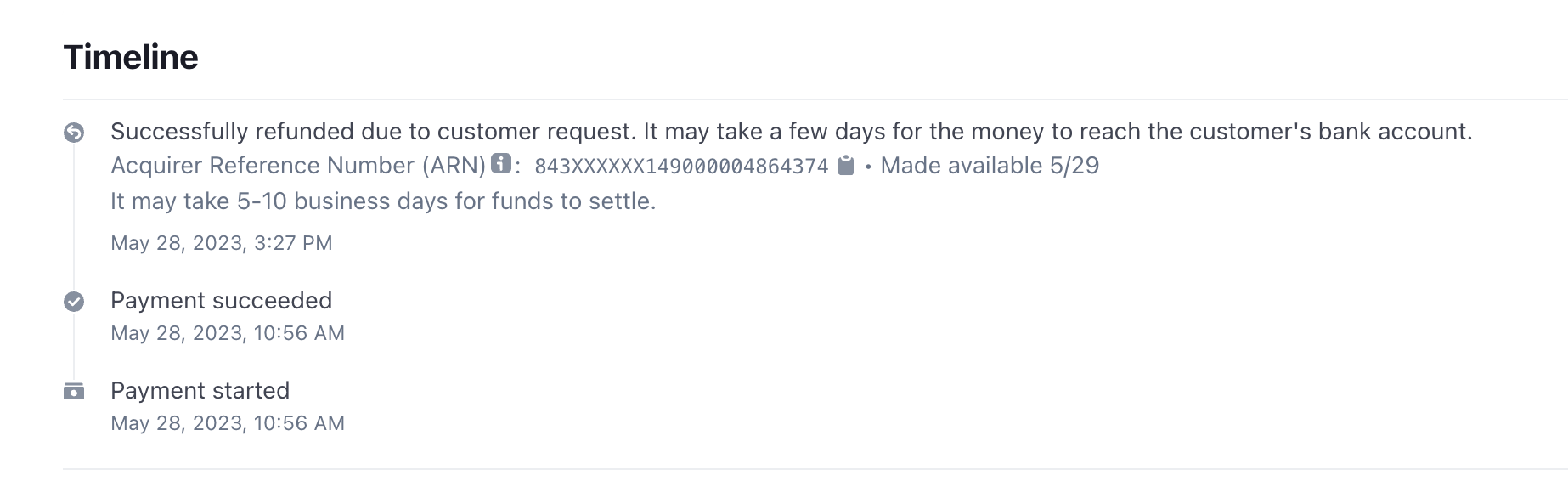 1. **4 VISA ARN codes** - these can be found on Stripe under refunds that were processed greater than 7 days ago. VISA's will have a 4 in the second digit, like this: 74208352536000013652530
2. **Billing Descriptors** - very important, you provide us with **all** your billing descriptors, including shortened. On Stripe this can be found in the settings page [here](https://dashboard.stripe.com/settings/public).
Please allow up to 48 hours for Ethoca and CDRN alerts to be sent, and up to 1-2 weeks for RDR alerts. Once you have this info, make an account on our website [here](https://app.chargeblast.com/auth/registration), and follow the onboarding instructions.
1. **4 VISA ARN codes** - these can be found on Stripe under refunds that were processed greater than 7 days ago. VISA's will have a 4 in the second digit, like this: 74208352536000013652530
2. **Billing Descriptors** - very important, you provide us with **all** your billing descriptors, including shortened. On Stripe this can be found in the settings page [here](https://dashboard.stripe.com/settings/public).
Please allow up to 48 hours for Ethoca and CDRN alerts to be sent, and up to 1-2 weeks for RDR alerts. Once you have this info, make an account on our website [here](https://app.chargeblast.com/auth/registration), and follow the onboarding instructions.