
/orders/:id in your own API).
You will expose an endpoint that receives each lookup request, optionally checks that the call really came from Chargeblast, finds the matching transaction in your systems, and answers with found (success) or not found—the following sections spell out headers, security, and the exact JSON shape.
This is the pull path described under Digital Receipts & Deflections (Pull Data). Return to that page for the high-level implementation steps and qualifying fields for deflection.
1. Enabling the feature
In Chargeblast (Developer settings):- Set Digital receipt lookup URL to your host and path without the
https://prefix (for exampleapi.example.com/v1/chargeblast/digital_receipt_lookup). Chargeblast callshttps://{that value}. - Turn the toggle on.
- Note two secrets (both can be rotated independently):
- Lookup key — sent as plaintext in
X-Digital-Receipt-Lookup-Key. - Lookup signature key — used only on your side to verify
X-Digital-Receipt-Signature(HMAC; see HMAC-SHA256 signature).
- Lookup key — sent as plaintext in
Testing in the app
The Chargeblast app includes developer tooling so you can validate your integration without waiting for live issuer traffic. You can send test lookup events to your URL, replay earlier requests to iterate on matching and receipt JSON, and review timing, headers, and validation feedback in one place—so you can confirm HMAC handling, response shape, and SLA before production lookups hit your endpoint. Use Send test webhook (and related controls in the same area) to drive those runs and inspect the exact cURL, payloads, and hints the UI surfaces.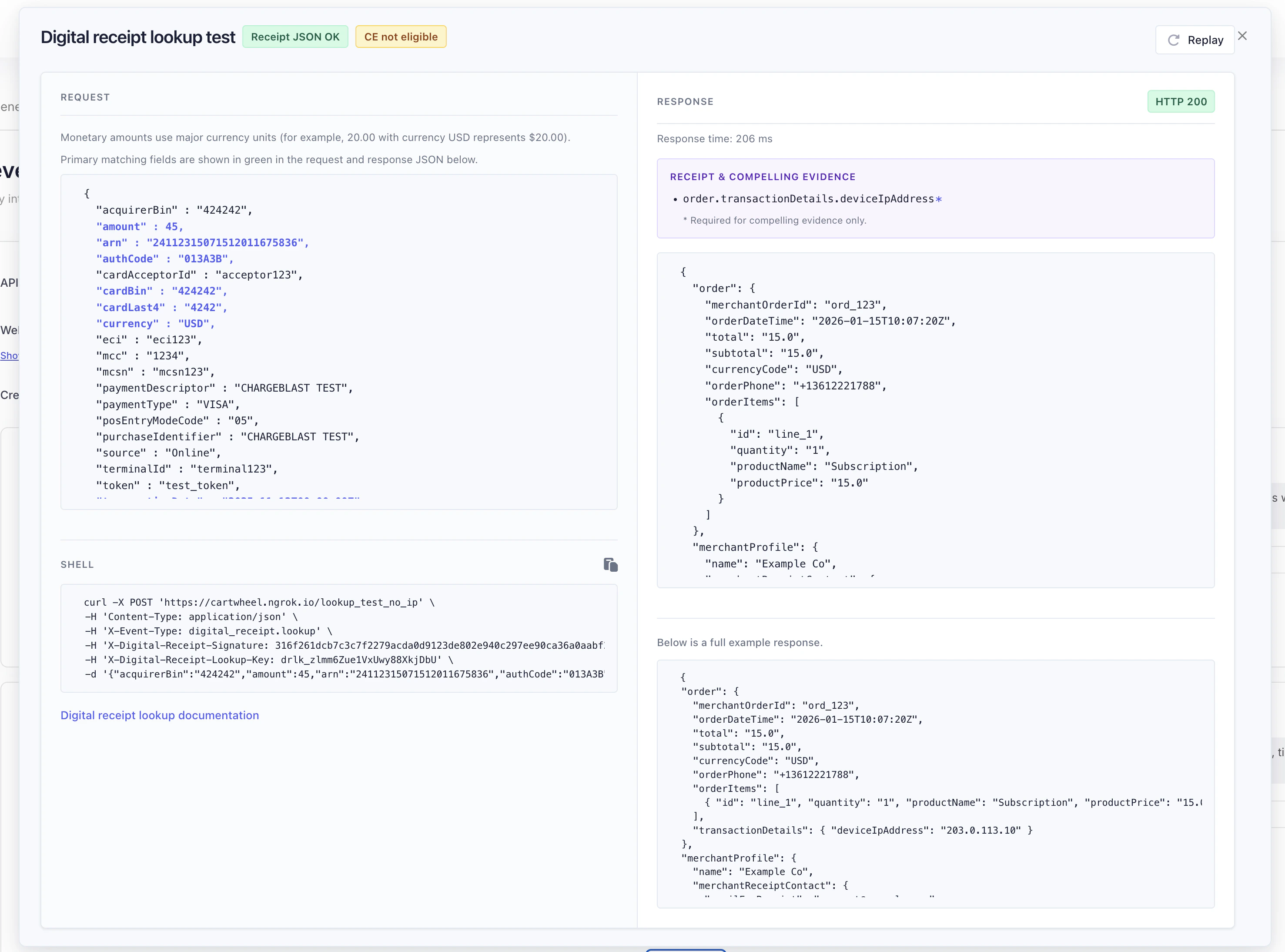
2. Request method, URL, and headers
Where the digest is (no separate timestamp)
- The digest is the header value
X-Digital-Receipt-Signature. It is not in the JSON body. The string is exactly 64 characters (0–9,a–f): the hex encoding of the 32-byte HMAC-SHA256 output. There is no separateDigestfield, body field, or second signature—if you do not see a digest, check request headers, not the body. (The dashboard Send test webhook cURL includes the same header.) - There is no timestamp header (for example no
X-Digital-Receipt-Timestamp) and nothing is prepended or appended to the body before HMAC. The MAC uses only the lookup signature key (UTF-8, as the HMAC key) and the raw POST body bytes (as the message). You do not need a timestamp to compute or verify the signature: re-read the exact body bytes from the request, run the same HMAC with your stored secret, and compare to the header (prefer constant-time comparison). - Replay: The signature does not by itself prevent replay of a captured valid request. Mitigate with HTTPS, rotating keys, idempotent handlers, and your own rate limiting as needed.
3. Request body (wire format)
The JSON body is derived from Chargeblast’s internal search object for digital receipt lookups. It is a single normalized payload for Visa, Mastercard, Discover, and Amex search requests—implement one matching path regardless of network.3.1 Primary keys for matching (always present)
These fields are guaranteed on every lookup. Use them as the primary keys when resolving the transaction in your system:3.2 source
The source field indicates where the lookup was initiated—for example a call center, an issuer banking or mobile app, or another channel. Network and product determine the exact values; use it for logging, routing, or extra context alongside the guaranteed match keys above.
3.3 JSON serialization (critical for HMAC)
The body is built as compact JSON with:JSONSerializationwith.sortedKeys— keys are in sorted order at every object level.- UTF-8 encoding.
3.4 Other fields (optional)
Additional keys may appear depending on the transaction (for exampleamount, paymentType, token, terminalId, acquirerBin, cardAcceptorId, mcsn, purchaseIdentifier, transactionId, transactionType, cardExpirationDate, mcc, posEntryModeCode, eci). Treat them as supplemental for matching or display—not substitutes for the guaranteed fields in Primary keys for matching.
4. HMAC-SHA256 signature algorithm
This is not a bare SHA-256 hash of the body. It is HMAC-SHA256:signature = HMAC-SHA256(secret, bodyUTF8)
as defined in RFC 2104, using SHA-256 as the hash function (FIPS-compatible HMAC-SHA256). There is no timestamp in the scheme: verification is only key + raw body → hex MAC → compare to X-Digital-Receipt-Signature (see Where the digest is).
4.1 Steps (normative for interoperability)
- Let
secretbe the lookup signature key string from Chargeblast settings (UTF-8 bytes). - Let
bodybe the raw HTTP request body as received (the same bytes as inContent-Length). Treat it as a UTF-8 string only if you know it is valid UTF-8 JSON; the HMAC is over those bytes. - Compute
HMAC_SHA256(secret_utf8, body_bytes)using the standard library for your language (see examples below). - Encode the 32-byte MAC as lowercase hex (64 characters): each byte as two hex digits
00–ff, no separators, no0x. - Compare that string to
X-Digital-Receipt-Signatureusing constant-time equality when possible. Do not expect a timestamp header or at=/v1=style signed prefix—those are not used here.
4.2 Reference implementation (Chargeblast server)
The server uses Swift CryptoKit-style HMAC:- Key material:
SymmetricKey(data: Data(secret.utf8)) - Message:
Data(body.utf8)wherebodyis the exact JSON string used as the POST body - Output: hex string via
%02hhxper byte (lowercase), set as theX-Digital-Receipt-Signatureheader value
4.3 Examples (Node.js, Python, Go)
Use the raw body buffer from your HTTP framework (before JSON parsing) as the HMAC message. Compare the computed hex to the header with constant-time equality when available.hmac.compare_digest(computed, header_value).
4.4 Verification checklist (signature mismatches)
- Using the signature secret, not the lookup key.
- HMAC is over raw body bytes, not pretty-printed JSON.
- Same sorted-key canonical form as the sender (or read body as sent and do not reserialize before verifying).
- Compare hex case-insensitively if your stack emits uppercase (Chargeblast sends lowercase).
- Expecting a timestamp or signed-prefix scheme—none is sent; only the header + body HMAC applies.
5. Using only the lookup key (weaker authentication)
Recommended: verifyX-Digital-Receipt-Signature with your signature secret and require X-Digital-Receipt-Lookup-Key to equal your lookup key. That way:
- Possession of the lookup key alone is not enough to forge payloads without knowing the signature secret (and without breaking HMAC).
- The body cannot be tampered with in transit without invalidating the MAC (assuming the secret stays private).
X-Digital-Receipt-Lookup-Key matches your configured lookup key and skip HMAC verification.
Chargeblast still sends both headers; skipping signature verification is your policy choice.
6. Response: HTTP status
You do not need a top-level
response wrapper. responseStatus in JSON is optional for minimal shape; found vs not found is primarily driven by HTTP status (200 vs 404).
7. Minimal successful JSON (top-level keys)
Chargeblast accepts a minimal object with top-levelorder, merchantProfile, and accountProfile (and optional responseStatus).
7.1 Required for a valid minimal receipt (decode succeeds)
These are enforced for the minimal path (structural validation). Amounts are strings in the merchant JSON (e.g."15.00"), not necessarily the same type as the inbound amount number.
7.2 Optional on the minimal path (but useful)
7.3 Compelling evidence (CE) vs “valid receipt”
A response can be structurally valid (decodes to a receipt) but still fail compelling-evidence rules used for disputes. In particular:order.transactionDetails.deviceIpAddressis important for CE but not part of the minimal required-field list above.- Other CE-related gaps are derived from the mapped receipt shape (merchant descriptors, product description, customer identifiers, delivery address, etc.).
(required for compelling evidence); in the Send test webhook UI, those paths are shown with a * and a short legend instead of that full suffix.
8. Example minimal body (illustrative)
9. Idempotency and side effects
Treat lookups as read-only from Chargeblast’s perspective: avoid charging customers or mutating state solely on receipt ofdigital_receipt.lookup unless that matches your own product design.
10. SLA and deflection eligibility
If response times repeatedly breach this SLA, Chargeblast emails the account owner to flag that lookup latency is consistently over the allowed window—so you can fix performance or capacity before more lookups fail.Related
- Digital Receipts & Deflections — Pull vs push, qualifying fields, monitoring
- Deflection Logs — Poll blocked chargebacks
- Implementation Overview — Compare integration paths
Describes behavior aligned with the Chargeblast application at the time of writing; verify against production if you depend on exact API guarantees.